
Muzio I Music Player & MP3 App
Red Sky LabsMusic & Audio
3.546.73K Reviews
- Version
- 7.8.4
- Installs
- 100.00M
- Age Rating
- Everyone
Screenshots

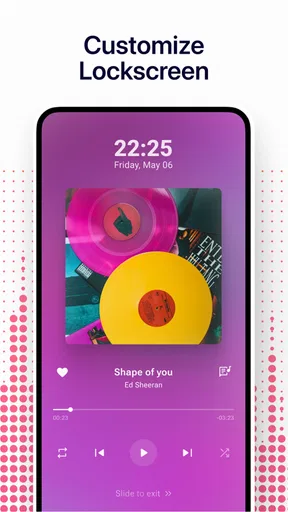
Our Review of Muzio I Music Player & MP3 App
 Analysis by Appyee
When I want to play music already stored on a phone, I care less about streaming catalogs and more about whether I can find a track quickly, shape its sound, and keep listening without a connection. That is the sort of everyday job Muzio Music Player & MP3 App is meant to handle. It is a free music and audio app from Red Sky Labs, with a 3.6 average from around 2.1 million ratings and over 100 million installs. Those figures suggest broad reach, but they do not tell you whether its particular mix of playback tools suits your habits.
A local player, not a streaming replacement
The first useful distinction is that this is best approached as a player for audio you can access on your device, rather than as a service for discovering and streaming a vast catalog. If your routine revolves around saved albums, personal recordings, or tracks you have organized yourself, that focus can be a plus: you can work with your own collection instead of navigating recommendations and subscriptions. If you expect one app to supply new music on demand, a streaming service is the more natural choice.
The app’s name points to two practical jobs: playing audio and trimming MP3 files. The cutter can be useful when you want to turn a particular passage into a ringtone, but it is worth thinking through the workflow before editing. Pick the source track, identify the section you want, and listen back to the selection before using it. A few seconds of checking can spare you from setting a ringtone that begins too early or cuts off an important note. Treat the original track as your master copy and keep a separate edited version if you want to preserve the full song unchanged.
What to expect from playback and sound controls
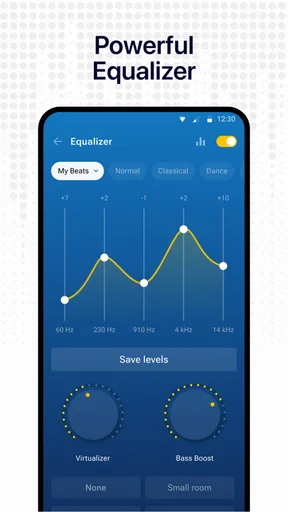
The equalizer is the feature I would try early, but I would make small changes rather than pushing every control at once. A strong bass adjustment may sound exciting through one pair of headphones and muddy through another; a preset or modest tweak is often a better starting point than chasing maximum impact. Compare the same track before and after each change, ideally at a similar volume. That makes it easier to tell whether the adjustment improves the sound or merely makes it louder.
Music-player performance also depends on more than the app itself. A large collection, the phone’s available memory, other apps running, and the audio file being played can all affect how responsive a session feels. I would not assume that an equalizer can make a low-quality recording sound pristine, either. It can alter tonal balance, not restore detail that is not in the source. For everyday listening, the useful question is whether the controls help you make your own library more comfortable to hear.
For a quick commute, I would prepare a short playlist or a small group of albums before leaving, then check that the files are available offline. That is a more dependable habit than discovering on a train or in a poor-signal area that a track you expected to hear is not stored where you thought it was. It also keeps the session simple: open the player, choose the prepared music, and spend less time searching while you are on the move.
Organizing a collection without turning it into a project
A tag editor is most valuable when the library has a real problem to solve. If a song appears under an incorrect artist or album, correcting the tag can make it easier to find later; editing every file just for tidiness can become a chore with little payoff. I would start with the tracks that are genuinely hard to locate, make one change at a time, and then check how the player displays the result. This small-batch approach helps avoid turning a quick cleanup into an afternoon of reorganizing music.
Before making edits, it is sensible to keep a copy of important files somewhere separate. That is especially true for recordings or rare tracks that would be difficult to replace. The practical benefit of a tag editor is control over your own library, but that control also makes it worth slowing down before saving changes. For someone whose collection is already neatly labeled, the tool may matter much less than playback and browsing.
Everyday convenience and the trade-offs
The sleep timer suits a different moment: listening in bed without wanting music to continue indefinitely. I would set it before settling down and choose a duration that leaves enough time to unwind, rather than relying on the phone to play until morning. The home-screen widget can also reduce friction when you want to pause or resume without reopening the full app. These conveniences are most useful when they fit an established routine; they are not reasons on their own to switch from a player you already like.
Compared with a basic player bundled with a phone, Muzio’s appeal is the combination of sound adjustment, file organization, and an MP3-cutting tool in one place. Compared with a streaming app, its strength is working with your own audio rather than supplying a changing online catalog. The trade-off is that your listening choices depend on the files you have available. If you want discovery, synchronized playlists across several services, or a library managed for you, a streaming-focused alternative will probably feel more convenient.
The app is free to install, though it offers in-app purchases ranging from $0.99 to $49.99 per item. I would begin with the free experience and decide whether any paid option addresses a need you actually have, rather than treating an upgrade as a prerequisite for ordinary playback. Its Everyone content rating makes it suitable for a broad audience, while the current version is 7.8.3 and the minimum Android requirement is 7.0. Those details make it easier to judge basic compatibility before spending time moving a library over.
The Ultimate Listening Experience
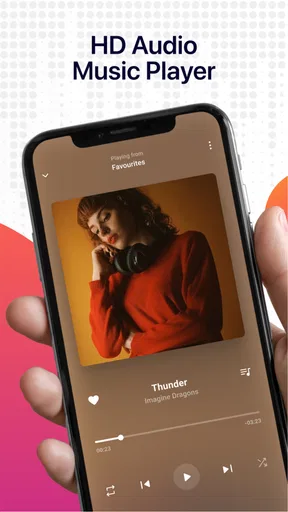
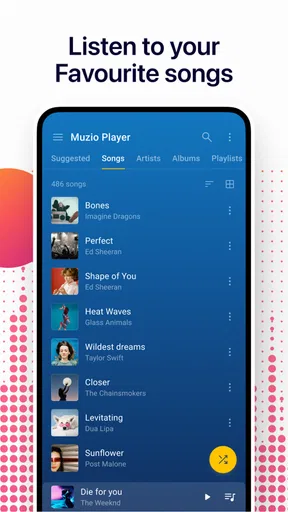
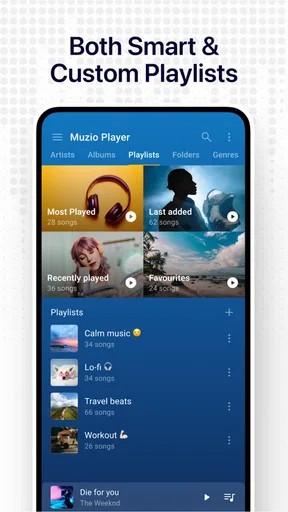
First off, Muzio Music Player & MP3 App is all about elevating your listening experience. With its intuitive user interface, you’ll find it super easy to navigate through your playlists, albums, and tracks. No more fumbling around trying to find your favorite tune; everything is right at your fingertips.
One thing that truly stands out is the app’s customizable equalizer. You can tweak the sound settings to match your mood or the genre you’re jamming to. Whether you’re into bass-heavy beats or crisp acoustics, the options are endless, and the sound quality is top-notch.
Features Galore
Muzio doesn’t hold back when it comes to features. It supports a wide range of audio formats, so you’re not limited to just MP3s. The app also comes with a built-in tag editor, which is a lifesaver for those of us who like our music library neat and organized. Say goodbye to mislabeled tracks!
And let’s talk about the offline capabilities. You can download your favorite tracks and listen to them without an internet connection, which is perfect for when you’re off the grid. Plus, the app’s integration with cloud storage services means you can easily access your music collection from anywhere.
Design and Usability
Design-wise, Muzio is a winner. The app sports a sleek, modern look that’s easy on the eyes. The color schemes are customizable, allowing you to tailor the app’s appearance to your liking. It’s like having a personalized music player in your pocket.
Usability is another strong suit. The app runs smoothly without any glitches or lags, even when you’re multitasking or running other apps in the background. The developers clearly know what they’re doing when it comes to optimizing performance.
Extras That Make a Difference
Beyond the basics, Muzio offers some nifty extras that enhance your overall experience. The sleep timer is a handy feature for those who like to fall asleep to their favorite melodies. Simply set the timer, and the app will automatically shut off after your chosen duration.
There’s also a widget option, making it easy to control your music straight from the home screen. It’s these little touches that set Muzio apart from other music apps in the market.
Final Thoughts
All in all, Muzio Music Player & MP3 App is a powerhouse in the realm of music apps. It combines functionality, design, and performance seamlessly, offering a user experience that’s hard to beat. Whether you’re a casual listener or a die-hard audiophile, this app is sure to meet your needs and then some.
If you’re ready to take your music listening to the next level, give Muzio a try. It’s available for download on both Android and iOS. Trust me, your ears will thank you!
How I would judge speed and stability
For a music player, speed is less about flashy transitions and more about whether a chosen track starts promptly, the library is easy to navigate, and playback continues while I do something else on the phone. A compact session with a few familiar albums is a good first test. Then I would try a larger collection and switch between browsing and playback. That gives a more realistic sense of responsiveness than judging the app from its first launch alone.
I would also separate occasional waiting from a genuine reliability problem. A phone may need a moment to make a collection available, while interruptions can come from low storage, background activity, or an audio file that is itself damaged. If something stops unexpectedly, I would first try another track, then reopen the player and check whether the same issue follows one file or the whole library. That simple sequence helps narrow down the cause before making broad changes.
Handling longer sessions and interruptions
Heavy use is where practical habits matter. If I am listening during a long work session, I would queue music before starting a task and avoid repeatedly changing equalizer settings or editing tags mid-playback. Editing is better treated as a separate library-maintenance job, especially when a track is already playing or the phone is busy. It keeps the listening session focused and makes it easier to notice whether a problem is tied to playback or to a change I just made.
For a day with patchy reception, the useful preparation is to confirm that the audio I want is genuinely available offline. “Offline” is most helpful when it describes files already accessible on the device, not a plan to fetch something later. I would test one track before leaving home, particularly if the playlist mixes files stored in different places. That small check prevents the frustrating version of offline listening: discovering the gap only after losing connectivity.
Battery and storage needs can vary with the phone, the length of the session, and what else is running, so I would not assume a music app has no impact on a device. If battery life is already tight, lowering screen use and closing tasks I do not need are more reliable steps than expecting a player to compensate for an overloaded phone. Likewise, keeping a very large music collection on a device has a storage cost regardless of which player organizes it.
Who will get the most from it
I think this app makes the most sense for someone who already owns or keeps audio files and wants more control than a barebones player offers. The combination of playback, an equalizer, tagging, and ringtone trimming can make it a handy everyday toolbox. It is also a reasonable fit for people who listen in places where a connection is unreliable, provided they prepare their local music in advance.
It is less compelling for someone who mainly asks a music app to recommend unfamiliar artists, build an automatically updated listening history, or provide a ready-made catalog. In that case, I would choose a service designed around streaming and discovery. I would also avoid switching a carefully organized library on the strength of feature count alone: first try the player with a small set of tracks, see how its navigation feels, and only then decide whether moving more of your listening routine is worthwhile.
My performance verdict
My practical verdict is that Muzio’s strongest case is convenience across several local-audio tasks, not a promise that every phone or library will behave identically. It has tools that can reduce small daily annoyances—finding a mislabeled track, adjusting the sound for headphones, or preparing a ringtone—but the benefits depend on actually using those tools. A listener who only presses play may find a simpler default player just as suitable.
I would try it with a few ordinary listening situations first: a commute playlist, a bedtime session using the timer, and a short tag correction. If those work smoothly on your device, expand from there. If the interface or playback behavior feels unreliable with your particular files, there is little reason to force the fit; a simpler player or a streaming alternative may serve you better. For someone who wants a flexible home for personal audio, though, Muzio is worth a measured try rather than an automatic commitment.
Verdict
Strengths of Muzio I Music Player & MP3 App
- Intuitive and user-friendly interface.
- Supports a wide range of audio formats.
- Customizable equalizer settings.
- Offline music playback available.
- Minimal battery consumption.
Limitations of Muzio I Music Player & MP3 App
- Contains occasional ads during use.
- Limited features in the free version.
- May lack advanced playlist options.
- Requires permissions for media access.
- No built-in lyrics support.
Other Releases by Red Sky Labs
View All
QR Scanner - QR Code Scanner
Productivity4.0

Copy My Data: Transfer Content
Tools4.3
Similar Picks in This Category
View All
YouTube Music
Google LLC4.4

Samsung Music
Samsung Electronics Co., Ltd.3.8

Spotify: Music and Podcasts
Spotify AB4.3

JioSaavn - Music & Podcasts
Saavn Media Limited4.3

Lark Player:Music Player & MP3
Lark Player Studio - Music, MP3 & Video Player4.6

StarMaker: Sing Karaoke Songs
SKYWORK AI PTE. LTD.4.3
Frequently Asked Questions
What features does Muzio Music Player & MP3 App offer?
Muzio Music Player & MP3 App offers a range of features designed to enhance your music listening experience. It supports various audio formats, includes a powerful equalizer, and offers a customizable user interface. Additionally, it provides offline playback, playlist management, and sleep timer options. The app also integrates lyrics support and offers widgets for quick access.
Is Muzio Music Player & MP3 App free to use?
Yes, Muzio Music Player & MP3 App is free to download and use. However, it may offer in-app purchases or ads that provide additional features or an ad-free experience. Users can opt for these premium features to enhance their experience, although the free version already includes a comprehensive set of functionalities.
Can I use Muzio Music Player & MP3 App offline?
Absolutely, Muzio Music Player & MP3 App supports offline playback. Once you have your music files downloaded onto your device, you can listen to them without needing an internet connection. This is particularly useful for users who want to save data or enjoy music in areas with poor connectivity.
What audio formats does Muzio Music Player & MP3 App support?
Muzio Music Player & MP3 App supports a wide range of audio formats, including MP3, WAV, AAC, FLAC, and more. This flexibility allows users to play almost any audio file without needing to convert them, ensuring that you can enjoy your music collection in its original quality.
How does Muzio Music Player & MP3 App enhance audio quality?
Muzio Music Player & MP3 App includes a powerful equalizer that allows users to adjust sound frequencies to their preference, enhancing the overall audio quality. It offers preset modes for different music genres and the option to customize the sound settings, providing a tailored listening experience for audiophiles and casual listeners alike.
